How NexWave Handles GST-Inclusive Pricing the New Zealand Way
New Zealand businesses price, quote, and invoice in GST-inclusive terms. NexWave treats that as the default, not the exception.
New Zealand businesses do not operate the way many global accounting platforms assume. Walk into any shop, cafe, or trades business in Auckland and the price you see already includes GST. The swing tag reads $1,150 rather than "$1,000 plus GST". Invoices to end customers quote the inclusive total first. Bank statements show inclusive amounts. This is not a preference, it is how the country does business, reinforced by the Fair Trading Act.
When an accounting system forces you to enter prices GST-exclusive and then adds 15% on top, you end up translating in your head on every transaction. The translation is small (divide by 1.15 to find the net, then re-enter) but the cognitive tax adds up across two hundred invoices a month. Sales staff stop doing the arithmetic. Accountants find the errors at month-end when GST returns will not reconcile. Spreadsheet workarounds accumulate. Eventually the finance team stops trusting the system.
NexWave is built to match how New Zealand businesses actually price, quote, and invoice. This article covers the three places that show up: document-level pricing, journal entries, and the tax configuration.
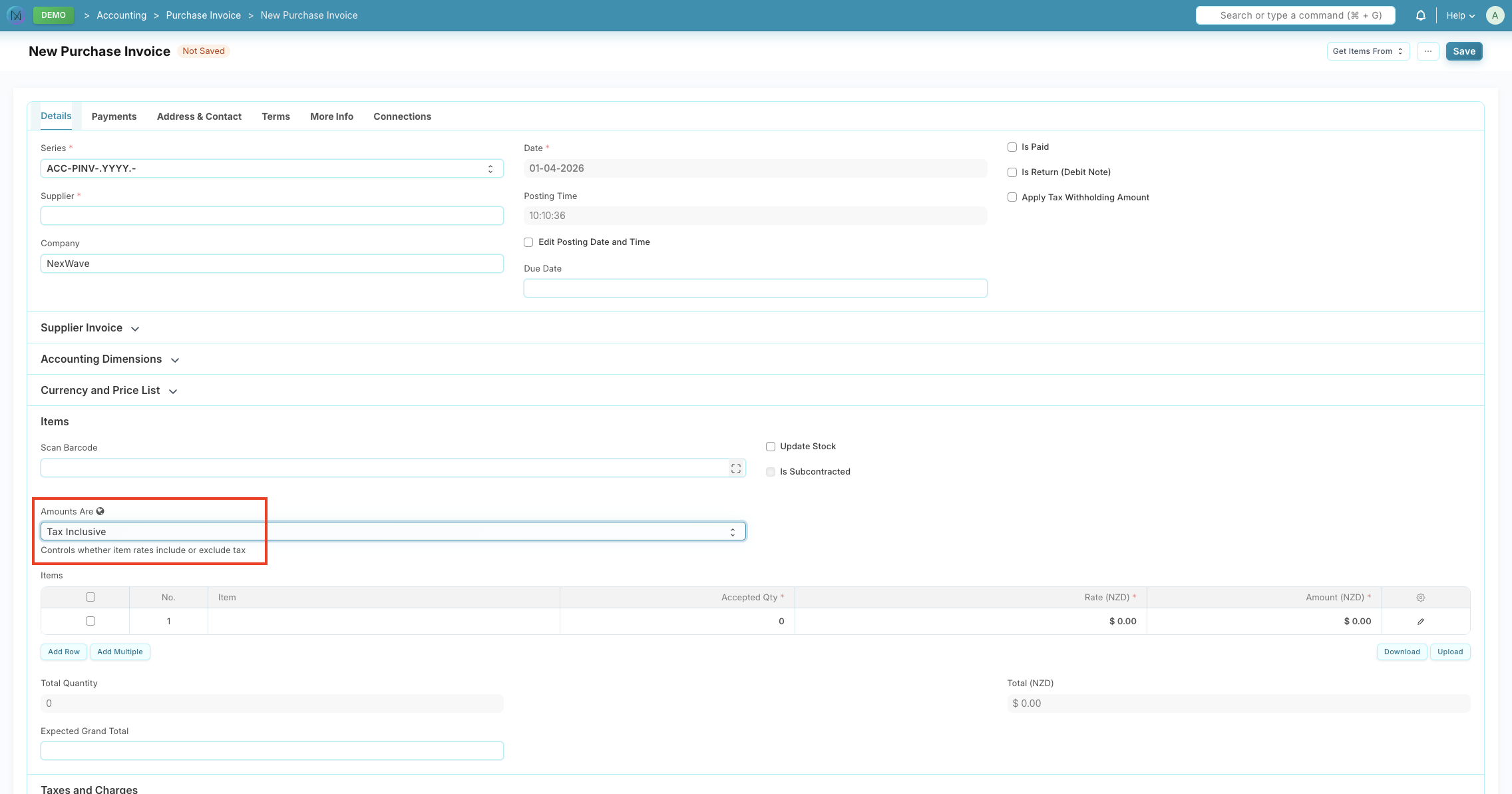
Per-document pricing: Inclusive or Exclusive, per transaction
Every document in NexWave where GST matters has an Amounts Are toggle. You can switch between Inclusive and Exclusive on:
- Sales Invoices
- Purchase Invoices
- Sales Orders
- Purchase Orders
- Quotations
The toggle is positioned prominently before the items table. It is not buried in a settings menu; it is a first-class part of the form.
For businesses that always work inclusive (most NZ retailers, trades, and hospitality operators fit this profile), NexWave lets you set a per-company default. The default applies to every new document, so staff never have to flip the toggle manually. Companies trading in both NZ and AU markets can maintain separate defaults per company record.
When you convert a Sales Order to a Sales Invoice, the Inclusive or Exclusive choice travels with it. The same applies for Purchase Orders to Purchase Invoices, Quotations to Sales Orders, and the return document flows. Your original decision is preserved through the whole document chain.
GST-aware journal entries
Invoices are the obvious case. Journal entries are the quieter friction point, and the one that trips up bookkeepers most often.
A bookkeeper recording a manual correction typically works from a bank statement or a physical receipt. They know the total amount (inclusive) and the GST rate, and they need to produce a balanced journal entry with separate net and GST lines. On a tax-exclusive-only system, this means computing the net by hand, entering one line, computing the GST, entering a second line, making sure both sides balance, and choosing the correct GST account.
In NexWave, you set a GST rate per line on a journal entry. In inclusive mode, the draft journal balances at gross amounts, matching how the bookkeeper is actually thinking about the transaction. When you submit, NexWave automatically splits each line into its net and GST components and posts the companion GST rows. The GST account is chosen based on the account type of the line: expenses and assets route to GST Paid, income routes to GST Collected.
In exclusive mode, GST rows appear immediately when the entry is saved. You get the same automation with the mental model that suits tax-exclusive workflows.
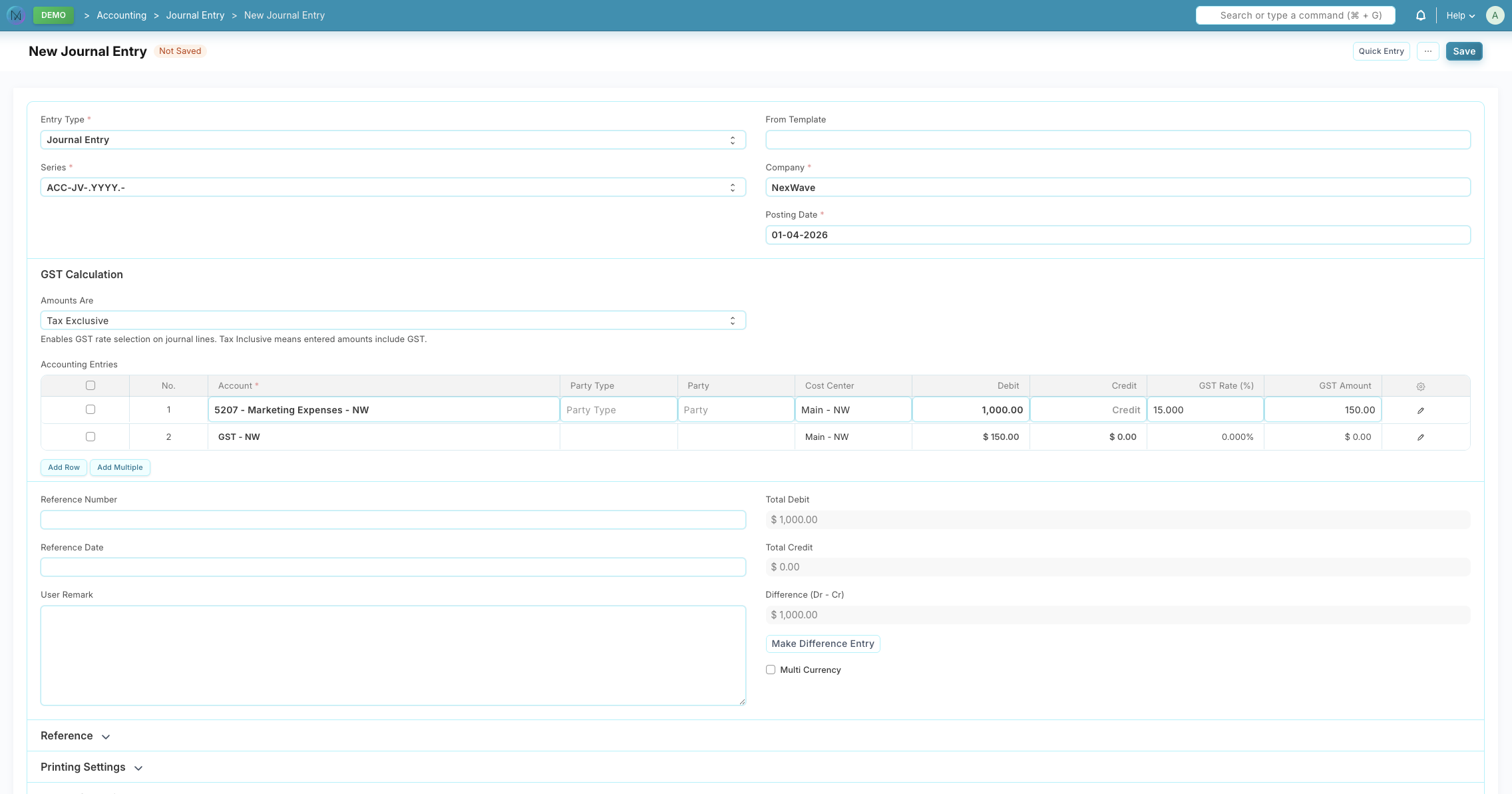
This matters for month-end close. NZ businesses posting corrections, reversals, and adjustments want to see the numbers they read off the source document. NexWave matches that expectation, then does the accounting plumbing automatically.
Tax configuration that does not require an accountant every time
NexWave ships with NZ-specific tax templates out of the box, including inclusive and exclusive variants for the 15% GST rate and templates for zero-rated and GST-exempt transactions. The templates are ready to apply on day one of implementation.
For businesses also trading in Australia, the same platform supports Australian GST (10%) with its own template library. A single NexWave deployment can handle a NZ entity and an AU entity side by side, each with its own tax rules and defaults.
What this removes from your day
The specific friction points NexWave's GST handling removes:
- Mental arithmetic on every sale. Sales staff enter the price they see on the swing tag, not a hand-calculated net value.
- Reconciliation gaps at month-end. GST returns tie back to source documents without spreadsheet bridges.
- Bookkeeper guesswork on journal entries. Manual corrections from bank statements balance the way the bookkeeper reads them.
- Workflow-breaking defaults. A per-company setting means the system matches your business every time, not transaction by transaction.
Working with Xero users
Many NZ businesses migrate to NexWave from Xero when their operations outgrow an accounting-only tool. One of the reasons finance teams dislike the switch to an ERP is that the inclusive-pricing workflow they rely on in Xero stops being natural. NexWave's design goal for this feature was explicitly to match the Xero mental model: inclusive as first-class, per-organisation default, gross journal entry balancing. Teams coming from Xero find the conceptual switch small, not jarring.
What NexWave does not claim
GST-inclusive support is table stakes for a modern NZ accounting platform. NexWave is not the only system that supports it. The distinction is in the details: that the toggle is per-document rather than a buried setting, that it flows through conversions and returns, that journal entries balance at gross in draft, and that the GST account is chosen automatically based on account type rather than requiring the user to pick it every time. Those details are what turn a feature that technically exists into one that actually gets used correctly by non-accountant staff.
Who benefits most
Businesses that see the largest day-to-day improvement from inclusive-first pricing are the ones where non-accountants enter most of the transactions: retail staff, trades operators doing on-site invoicing, hospitality POS operators, and professional services quoting from a job card. If your finance team is doing the quiet work of translating between the shop floor and the books, NexWave is designed to remove that step.
Run your accounting the way NZ actually does business.
NexWave is an ERP built for New Zealand and Australian businesses. GST-inclusive pricing, NZ bank formats, IRD-ready GST returns, all in one platform.
REQUEST A DEMORelated Articles
NexWave's Xero Integration: Built for What Production Actually Looks Like
NexWave's Xero integration handles the real-world cases most connectors skip: cancelled documents mid-push, worker re...
NexWave vs Xero: When Your Accounting Software Isn't Enough Anymore
Xero is an excellent accounting tool for most NZ small businesses. At some point, operations outgrow what an accounti...
Top Tips for a Successful ERP Implementation
Practical tips for a successful ERP implementation. From planning and vendor selection to data migration, change mana...