NexWave vs Xero: When Your Accounting Software Isn't Enough Anymore
Xero is excellent at what it does. NexWave starts where Xero stops.
Xero is the accounting software New Zealand businesses love. It is well designed, priced fairly for small businesses, and solves the hundred-and-first bookkeeping problem better than the hundred-and-first person who tried. Most NZ SMBs running on Xero should keep running on Xero.
But at some point, a growing business starts doing things Xero was never designed to do. Not because Xero failed to keep up, but because Xero chose, quite deliberately, to stay focused on accounting rather than becoming an everything-tool. When that happens, the business has a choice: keep extending Xero with plug-ins and spreadsheet workarounds, or move to a full ERP.
This article is about how to tell when you have reached that point, and how NexWave compares when you do.
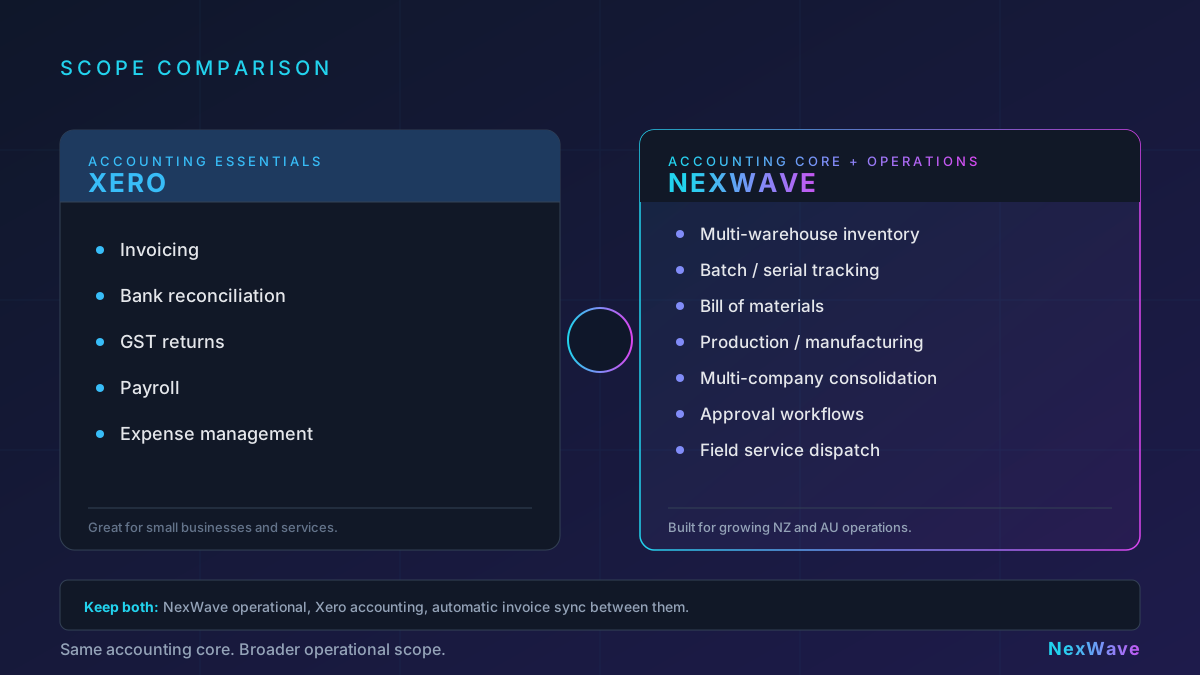
What Xero does extremely well
Before any comparison, the honest assessment: Xero is excellent at the core accounting workflow. Invoicing, bank reconciliation, expense management, basic reporting, payroll, GST returns, payment integrations. For a services business with low inventory complexity, 5 to 20 staff, and a single company structure, Xero can genuinely run the whole finance function.
The usability is the differentiator. Non-accountants can use Xero. The mobile app is competent. The marketplace of add-ons is large. The partner network of accountants and bookkeepers is excellent. A business does not outgrow Xero because Xero is bad. It outgrows Xero because the business starts doing things that are outside Xero's core scope.
Signs you have outgrown Xero
Not all of these will apply to every business. But if more than two or three are true, it is worth evaluating whether an ERP makes sense.
1. Inventory has become non-trivial
Xero's inventory is designed for simple stocked items: track a quantity, assign a cost, apply to invoices. If your operation involves any of the following, you are pushing Xero past its comfort zone:
- More than one warehouse location with separate stock balances.
- Batch or serial number tracking.
- Expiry date tracking for food, pharma, or regulated products.
- Bill of Materials (assemblies, kits, manufactured products).
- Stock valuation methods beyond average cost (FIFO, standard cost).
- Stock reconciliation when physical counts disagree with the ledger.
Each of these can be patched with an add-on or a spreadsheet. More than one or two at the same time, and the patching itself becomes a maintenance problem.
2. Manufacturing or production is part of the business
If you assemble, manufacture, or process inputs into outputs, Xero does not have a native answer. Production tracking, work-in-progress valuation, by-product handling, labour costing, and yield variance reporting are outside Xero's scope. ERP platforms are designed for this, and the difference in reporting accuracy over a year is significant.
3. You run multiple companies or entities
Xero handles one organisation per subscription. Multi-company businesses buy a separate subscription per entity and use group reporting plug-ins to consolidate. For two entities, this is manageable. For five entities with inter-company transactions, cost allocations, and shared customer or supplier records, the consolidation becomes its own workflow. A multi-company ERP handles this natively: one set of books per entity, intercompany transactions, consolidated reporting.
4. Workflow approval chains have become real
Xero supports basic approval workflows on purchase orders and bills. Beyond "requester and approver", the approval logic starts living in email threads. Multi-step approval chains, conditional approval based on amount or category, approval based on project or department, and automatic escalation after a delay are workflows an ERP handles by design.
5. Reporting has outgrown the dashboard
Xero has good built-in reports and reasonably flexible custom reports. But reports that cross transactional data (sales by salesperson by month by product category, for example), reports that aggregate across multiple entities, or reports that require data Xero does not store natively (job costing, detailed stock valuations, custom dimensions) often end up being exported to Excel and manipulated by hand.
6. Field service or job tracking is part of the business
If your business dispatches technicians, runs projects with labour and materials, tracks job-level profitability, or schedules service appointments, Xero has no native module for this. Xero add-ons exist, but the integration quality varies. Field service and project management are core ERP modules by design.
7. Spreadsheets have become part of the workflow
The most reliable signal. If your finance or operations team has three or more running spreadsheets that are "used every day" and "the source of truth for X", it is a sign that the system of record is no longer doing what it needs to. Spreadsheets fill the gap for a while, then become a maintenance burden, then become a risk.
How NexWave compares, by category
Accounting core
NexWave has a full general ledger with a configurable chart of accounts, bank reconciliation, invoicing, bill management, GST handling (inclusive and exclusive), multi-currency, and standard financial reports (P&L, balance sheet, cash flow, trial balance). For the accounting use cases Xero covers outside of NZ payroll, NexWave covers the same ground. NexWave does not include NZ payroll; businesses typically run payroll through a dedicated payroll service (Smartly, iPayroll, MYOB, Xero Payroll, and similar) alongside NexWave. The other difference is interface depth: Xero is optimised for the everyday user; NexWave's accounting is deeper and therefore somewhat more structured.
Inventory and warehouse
This is where the gap is largest. NexWave has multi-warehouse inventory, batch and serial tracking, expiry management, bill of materials, production orders, stock reconciliation, multi-location transfers, and stock valuation reports. The warehouse module is part of the platform, not an add-on.
Manufacturing
NexWave includes production orders, bills of materials, operations and work centres, manufacturing variance reports, and work-in-progress accounting. Whether this is valuable depends on your business; for a manufacturer, it is a category that Xero simply does not attempt.
Multi-company
NexWave supports multiple companies in one instance, with inter-company transactions, shared customer and supplier records, and consolidated financial reporting. For groups with NZ and AU entities, the same platform handles both.
Workflow and approvals
NexWave supports configurable approval workflows on any document type, with conditions based on amount, category, cost centre, or custom fields. Multi-step approvals and escalations are supported.
Reporting and customisation
NexWave's reporting is more flexible than Xero's at the cost of being slightly harder to learn. Custom reports can cross any of the transactional data, not just accounting records. Custom fields, custom doctypes, and custom workflows are a platform feature rather than an add-on.
Integration with Xero
A useful middle ground for some businesses is to run NexWave as the operational system and keep Xero as the accounting ledger. NexWave's Xero integration pushes Sales Invoices, Purchase Invoices, and Credit Notes to Xero automatically. Operations teams use NexWave for daily work; the accountant continues to work in Xero for bookkeeping and statutory reporting. This is a deliberate model for businesses whose accountants strongly prefer Xero.
When not to switch
If Xero is meeting your needs, do not move. Migrating from an accounting tool to an ERP is a project, not a settings change. It involves data migration, staff training, workflow redesign, and usually three to six months of implementation effort. That cost is worth it when the alternative is continued investment in workarounds, but it is not worth it if you are running Xero and it is simply fine.
The honest rule of thumb: if removing every spreadsheet from your finance or operations team's daily workflow would let you grow without adding headcount, an ERP pays back. If your spreadsheets are marginal and your growth curve is steady, stay where you are.
What to expect from the evaluation
Businesses evaluating NexWave against continued use of Xero typically find the decision turns on three questions:
- How much time is currently spent on workarounds?
- What will break, or become slower, if the business grows 2x in the next 18 months without changing the system?
- Is there an operational area (inventory, manufacturing, multi-company, field service) that is fundamentally outside Xero's scope?
If the answer to the third is yes, the decision is usually clear. If the first two answers are "a lot" and "several things", the answer is probably yes too. If both are "not much", staying on Xero is often the right call.
NexWave's team works with NZ businesses on this evaluation every week. If you are sitting in the middle of the decision, we are happy to help you work through it honestly, including telling you if Xero is still the right answer for now.
Not sure if you have outgrown Xero?
NexWave's team works with NZ businesses on this decision every week. If you are somewhere between 'Xero still works' and 'we need a real ERP', we are happy to help you work it out.
REQUEST A DEMORelated Articles
How NexWave Handles GST-Inclusive Pricing the New Zealand Way
New Zealand businesses price, quote, and invoice in GST-inclusive terms. NexWave treats that as the default, with per...
NexWave's Xero Integration: Built for What Production Actually Looks Like
NexWave's Xero integration handles the real-world cases most connectors skip: cancelled documents mid-push, worker re...
Top Tips for a Successful ERP Implementation
Practical tips for a successful ERP implementation. From planning and vendor selection to data migration, change mana...