NexWave's Xero Integration: Built for What Production Actually Looks Like
Syncing invoices between systems is easy on a calm afternoon. Here is how NexWave handles the afternoons that are not calm.
The usual way to describe a Xero integration is "it syncs your invoices to Xero". That is true, but it is also the version that hides the interesting problems. A two-line integration works perfectly on a calm afternoon with one user, no traffic, and a freshly restarted system. Production looks different.
In production, the worker pushing an invoice to Xero crashes halfway through. A user cancels a document locally while the Xero API call is in flight. A line item has no tax mapping, and the user sees a useless error. A bench upgrade restarts workers, and the sync queue is lost. Xero has a five-minute outage and every attempted push fails, then the queue tries again and creates duplicates of everything.
NexWave's Xero integration is designed around the assumption that each of those scenarios will happen, because each one has happened in production at a customer we support. This article walks through the design decisions that make the integration resilient, framed around what they mean for the finance team using it day to day.
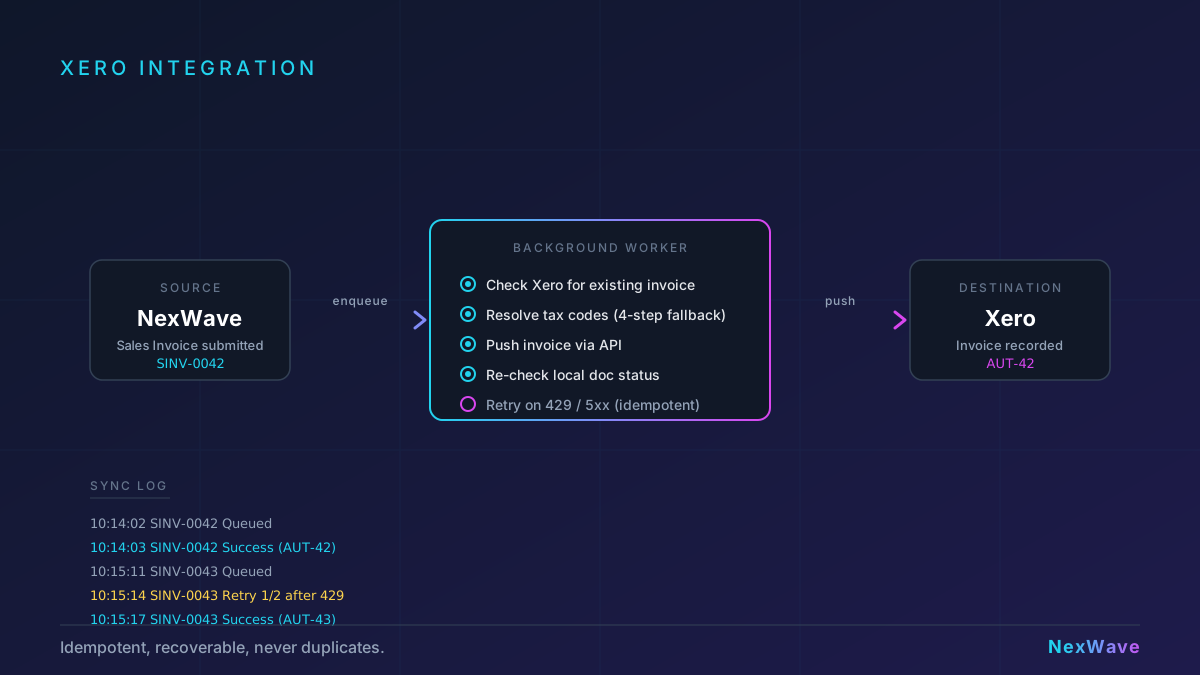
Decision 1: Submitting an invoice should not wait for Xero
When a NexWave user submits a Sales Invoice, the submit returns within milliseconds. The Xero push happens on a background worker. This matters because a Xero API call can take 500 milliseconds on a good day, three seconds when you hit their rate limit, and thirty seconds when their API is having a bad afternoon. Making invoice submission wait for Xero means every user pauses every time.
The push is queued only after the local database commit succeeds. If the invoice submit fails for any reason (validation error, permission issue, locked document), no Xero push is queued. Nothing is pushed to Xero that does not exist in NexWave.
Decision 2: Xero is the source of truth for "has this been pushed"
The naive way to track sync status is a flag on the local invoice: pushed_to_xero = 1 once the push succeeds. This fails the moment a worker dies after creating the Xero invoice but before updating the flag. The next attempt thinks the push did not happen, pushes again, and creates a duplicate.
NexWave asks Xero whether an invoice with the same number already exists before creating a new one. If it does, NexWave marks the local document as synced and moves on. If it does not, the invoice is created. The source of truth for duplicate prevention is Xero itself, not a local flag that might be stale. Workers can crash at any point, and retrying is always safe.
For finance teams, this means: if you are ever in doubt about whether an invoice made it to Xero, you can retry the sync from the Sync Log without worrying about creating a duplicate.
Decision 3: The document can be cancelled while the push is in flight
Here is a real scenario: a user submits an invoice. The background worker picks it up. The worker calls Xero. While the Xero API call is in flight, a second user cancels the invoice in NexWave. The Xero call completes successfully. The invoice is now active in Xero and cancelled in NexWave.
NexWave's Xero integration rechecks the local document status after the Xero API call returns. If the document has been cancelled in the meantime, the integration voids the Xero invoice automatically and records the void in the Sync Log. The Xero invoice is briefly live during the push itself, but the window closes within seconds rather than sitting there waiting for someone to notice at month-end.
Decision 4: Tax mapping failures should be actionable
Xero is strict about tax codes. Every line needs a tax code that exists in the user's Xero organisation. When the mapping is wrong, the push fails, and the question is what the user sees.
NexWave resolves the tax code per line through a four-step fallback chain, in order:
- Line-level Item Tax Template (if the line has one).
- Document-level Taxes and Charges Template.
- Item master's default tax template.
- Company default tax template.
Each step maps to a Xero tax code through a configurable lookup table the user sets up during initial configuration. If all four steps fail, the push fails with a specific error that names the item and the missing mapping: "No tax mapping for item INV-0042. Map it in Xero Sync Settings." That error is actionable. The accountant can fix it in thirty seconds rather than raising a support ticket.
Decision 5: Stuck documents should be recoverable
Every sync has four explicit statuses: Queued, Success, Failed, and Voided. A fifth state exists implicitly, a Queued sync whose worker has died and left the record stuck. This happens when a worker runs out of memory, restarts mid-push, or the queue is flushed during a platform upgrade.
Documents in Queued status that are older than a configurable threshold are surfaced in the NexWave Xero Sync Log with a clear "stuck, retry?" affordance. Accountants can retry from the UI. Because the retry is idempotent by Xero lookup (see Decision 2), retrying a document that actually did succeed quietly marks it as synced without creating a duplicate.
There is also an orphan check: if NexWave shows a document as cancelled but the Sync Log shows it was successfully pushed to Xero, the integration warns the accountant and offers a one-click void of the Xero invoice. This catches the rare case where cancellation happened outside the normal document lifecycle.
What is not in scope
NexWave's Xero integration does one thing well: pushing invoices, credit notes, and purchase invoices from NexWave to Xero reliably. Some things are deliberately out of scope:
- Real-time webhook sync from Xero back to NexWave. A different workflow handles that.
- Bi-directional conflict resolution on the same document. The push direction is one-way by design to keep the audit trail clean.
- Complex multi-stage approval chains inside Xero. NexWave's approval workflows live in NexWave; Xero sees the final submitted document.
This discipline keeps the integration predictable. Businesses know what it does and what it does not, and the scope stays narrow enough that every edge case is covered properly.
What production readiness actually means
Reading the five decisions back, the pattern is consistent: every one assumes something will go wrong. The worker will crash. The user will cancel. The network will drop. The tax mapping will be missing. The push will be duplicated.
The integration is not reliable because of defensive code sprinkled through the pipeline. It is reliable because the data structures and lookup chains make the wrong outcomes structurally impossible. Idempotency by remote lookup means duplicates cannot happen. Rechecking document status after the API call means silent mismatches close within seconds. Queued submission means a slow Xero does not slow the user down. Specific tax errors mean the accountant can fix the problem themselves.
If your current Xero integration only works when everything goes right, you have something closer to a demo than a production system. NexWave's is built for the afternoons that are not calm.
Reliable Xero sync without the spreadsheets
NexWave's Xero integration pushes invoices, credit notes, and purchase bills automatically, with recovery paths for every failure mode we have seen in production.
REQUEST A DEMORelated Articles
How NexWave Handles GST-Inclusive Pricing the New Zealand Way
New Zealand businesses price, quote, and invoice in GST-inclusive terms. NexWave treats that as the default, with per...
NexWave vs Xero: When Your Accounting Software Isn't Enough Anymore
Xero is an excellent accounting tool for most NZ small businesses. At some point, operations outgrow what an accounti...
Top Tips for a Successful ERP Implementation
Practical tips for a successful ERP implementation. From planning and vendor selection to data migration, change mana...