Real-Time Shopify Inventory Sync for Growing NZ Retailers
Overselling and underselling are what happens when Shopify and your back-office drift apart. NexWave keeps them in step.
If you run a Shopify store backed by a physical warehouse, the biggest operational risk is simple: your online store says you have stock, and you do not, or your online store says you are out, and you have a pallet sitting in the back. Both lead directly to lost revenue or bad customer experiences, and both come from the same cause. The inventory numbers in Shopify have drifted away from the inventory numbers in your warehouse.
The only reliable fix is a connection between Shopify and your back-office that keeps the two in sync continuously. Not a spreadsheet import at the end of every day. Not an overnight batch job. An integration that reacts to stock movements within minutes and pushes the correct quantity to Shopify automatically.
NexWave's Shopify Connector is built for this. This article covers how the sync works, what scales it handles, and what a retailer should expect from a serious integration.
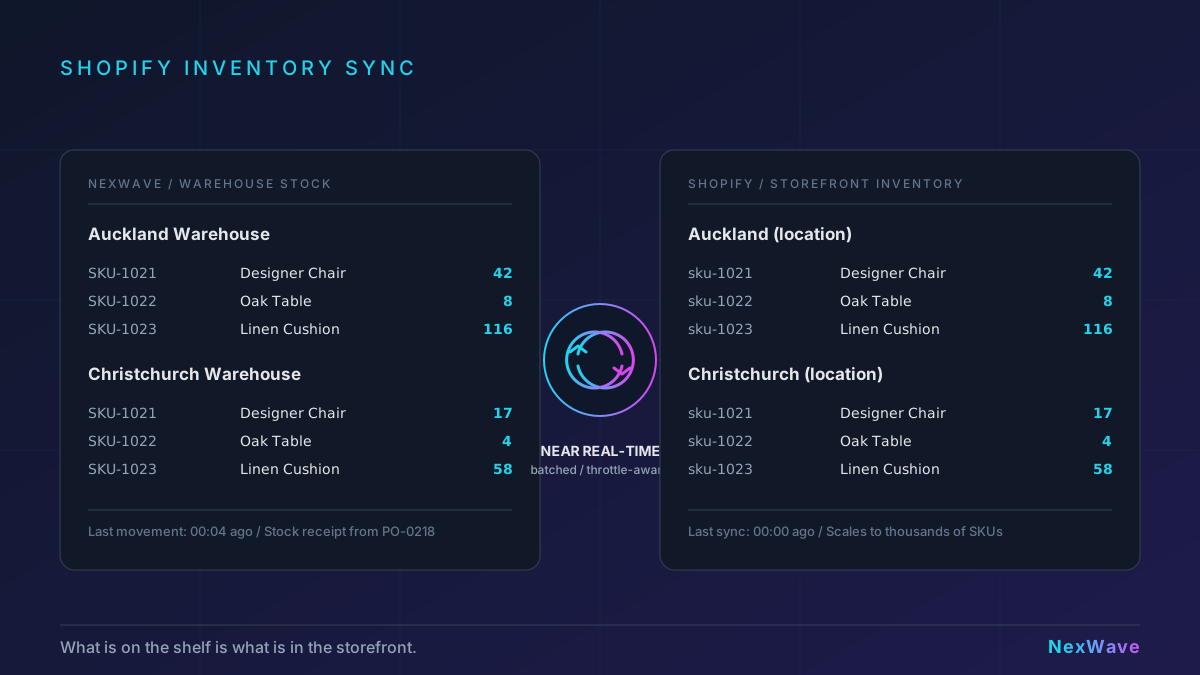
Stock levels sync in near real time
When inventory moves inside NexWave (a stock receipt from a purchase order, a fulfillment, a stock adjustment, a return, a transfer between warehouses), the change is reflected in Shopify within minutes. The sync runs on a configurable cadence per store, typically every 10 to 60 minutes, with a real-time path for the events that matter most, such as order fulfillment.
For most retailers, this means the product page on your storefront shows the current available quantity at your fulfillment location rather than a number that was true at 6am. Overselling drops to near zero. Manual stock adjustments in Shopify stop being part of anyone's job.
Multi-store support is a first-class feature
Many retailers run more than one Shopify store: a trade or wholesale store, a consumer store, a brand-specific store, or a regional store (AU and NZ versions of the same brand). Each store has its own catalogue, pricing, and in many cases its own fulfillment location.
NexWave treats each Shopify store as a separate record with its own credentials, its own location mappings, and its own sync settings. A single NexWave deployment connects to any number of stores. Product mappings, SKU aliases, and location-to-warehouse links are configured per store, so a trade store selling in bulk units and a consumer store selling in retail units can share the same underlying inventory without confusion.
Multi-location stock mapping, done properly
Shopify supports multiple locations natively. What matters for the retailer is whether the ERP mirrors that, so Shopify shows the right quantity at each fulfillment location rather than a single aggregated number.
Every NexWave Shopify Store maps one or more NexWave warehouses to Shopify locations. The sync handles each location independently: when a stock transfer moves 50 units from Auckland to Christchurch, the Auckland Shopify location decreases by 50 and the Christchurch location increases by 50. Customers in each region see the stock available at their nearest fulfillment point, which feeds Shopify's own location-based fulfillment and shipping rules.
Built to handle large catalogues
A retailer with 7,000 SKUs and a single warehouse is a common profile. A retailer with 7,000 SKUs, two warehouses, and two Shopify stores is also common. The naive approach to syncing (one API call per item per location) hits Shopify's rate limits and times out before it finishes.
NexWave's inventory sync is designed for this scale. It batches updates rather than making one call per item, and it applies throttling based on the actual state of Shopify's rate-limit bucket, not a blanket delay between calls. The practical consequence is that a full sync of a high-volume store completes in seconds rather than hours, and it scales with the size of your catalogue without needing manual intervention from the IT team.
Orders flow the other way
Inventory going out to Shopify is one direction. Orders coming back is the other. When a customer places an order on Shopify, the order is created in NexWave through a webhook within seconds. Customer records, addresses, line items, shipping lines, discounts, and tax amounts are all captured accurately, including tax handling that respects NZ and AU GST conventions.
For retailers that want the end-to-end automation, NexWave can auto-submit the Sales Order, auto-create the Sales Invoice, and auto-create the Payment Entry for paid orders. Each step is optional; retailers who prefer a human-in-the-loop for financial documents can leave the automation off for part or all of the chain.
What changes when sync just works
The specific daily operational changes retailers see when they move from a manual or batch-based Shopify sync to NexWave's near real-time sync:
- Oversell events drop. The online store stops selling items that are not physically available, because the quantity shown is the quantity actually on the shelf.
- Customer support escalations drop. Orders do not need to be cancelled and refunded because the stock was not really there.
- Manual reconciliation disappears. Someone was spending an hour a day exporting Shopify orders and matching them against the warehouse. That time goes back.
- Growth becomes operational, not technical. Adding a new Shopify store or a new warehouse location does not mean a new integration project. It is a configuration change.
What a good Shopify ERP integration looks like
If you are evaluating a Shopify ERP connector for your business, the questions that matter are:
- How quickly do inventory changes reach Shopify? (Minutes, not hours.)
- Does it sync per location, or only aggregate quantities?
- Does it handle multiple Shopify stores from one back-office?
- How does it behave at scale? (Does it complete on a 7,000-SKU catalogue, or does it time out?)
- How does it handle rate limits without getting stuck?
- What happens when Shopify is temporarily unavailable? (Retries, not silent failures.)
- How are orders brought back from Shopify, and how complete is the customer and tax data?
NexWave's Shopify Connector is designed to answer all seven clearly, with operational limits made explicit during implementation. That is what retailers should expect from a production integration.
Shopify inventory that matches what is actually on the shelf
NexWave's Shopify Connector handles real-time inventory sync, multi-location stock mapping, and multi-store management out of the box. Purpose-built for NZ and AU retailers.
REQUEST A DEMORelated Articles
How to Connect Shopify to Your Warehouse Management System
How to integrate Shopify with a warehouse management system. Covers inventory sync, order automation, multi-location ...
NexWave's Xero Integration: Built for What Production Actually Looks Like
NexWave's Xero integration handles the real-world cases most connectors skip: cancelled documents mid-push, worker re...